Showing posts with label wiki. Show all posts

Thursday, February 5, 2009

What Why & How to Wiki

Wiki 101: How To Get Started
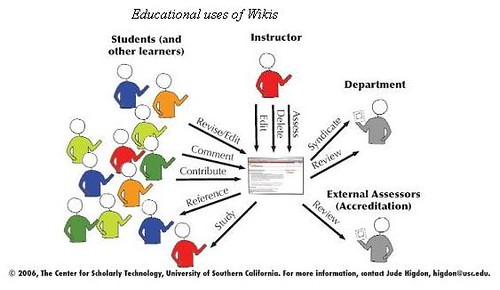
wiki%20in%20classes-1

What are Wikis:
For the Wiki wikipedia entry click here
To see Google's collection of definitions click here

Watch:
Video: Wikis in Plain English
Video: Blogs vs. Wikis
Video: Anatomy of a Wiki

Why Wiki

*Quick, Easy, and Free Web Publishing
* Take a constructivist model of learning by having students create meaningful and authentic learning products
*Builds Community
*Good for remote asynchronous collaboration
*It's democratic

See Also
Email vs Wiki Collaboration
Read Only vs. Read Write Web

How to Wiki
Choosing a Wiki Services
Google Sites (wiki): The Easiest Way to Start a Free Webpage
How to Track & See Wiki Changes in Google Sites

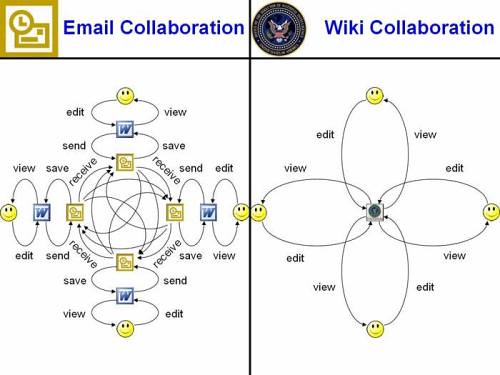
Email vs Wiki Collaboration


wiki_collaboration2, originally uploaded by edvibesproducer.

An effective visualization of the problems with email collaboration and how wiki's make collaboration easier

Choosing a Wiki Services

There are a couple of big and complicated matrices and comparison charts for software and web-based wiki services. But for educational purpose the four easiest and most popular web services are:


http://pbwiki.com/academic.wiki


http://www.wetpaint.com/


http://www.wikispaces.com/

I personally prefer google sites since I am a big fan of all of google's services and sites allows you to mashup and combine all into it's wiki.

Monday, February 2, 2009

How to Track & See Wiki Changes in Google Sites

(click on the image to see a zoomed in and clearer version)

One of the challenges of Wikis as a "live" document is keeping track of all the changes and edits from all the members of the group. I have taken a screen shot of a google site (wiki) page to show you three places you can check to see any changes that have been recently updated. There is also a subscribe to this site or page option where you can get an email alerting you every time the wiki has been updated and how.

Sunday, February 1, 2009

Google Sites (wiki): The Easiest Way to Start a Free Webpage

1) Go to Google Sites Overview Page watch the tour and read up

2) If you don’t have a Google Account sign up for one

3) Watch some tutorials from a Youtube Playlist from Google to get you up and started:


At least watch these:
How to create a new google site
How to edit a google site
How to embed content into a google site

4) Explore and start building

Video: Anatomy of a Wiki


YouTube - Anatomy of a Wiki: Using Wikispaces, they take you through a nice tour of all the main components of a wiki such as the navigation, history, and discussion

Video: Wikis in Plain English


YouTube - Wikis in Plain English

Video: Blogs vs. Wikis


YouTube - Blogs vs. Wikis: A fictional debate between JFK and Richard Nixon on the propriety of using blogs vs. wikis.

One main separation I have heard a lot of educators use for the students and educational purposes, blogs are for opinions, ideas, and journaling whereas, wikis can be used for facts, resources, and projects.